Explore the tools for bookings, equipment, warehouse preparation, crew, payments and business visibility. Some capabilities require Professional Edition, an optional add-on or a connected service.
Connect the customer-facing steps of a booking, from choosing equipment to accepting a quotation and paying an invoice.
Optional add-on
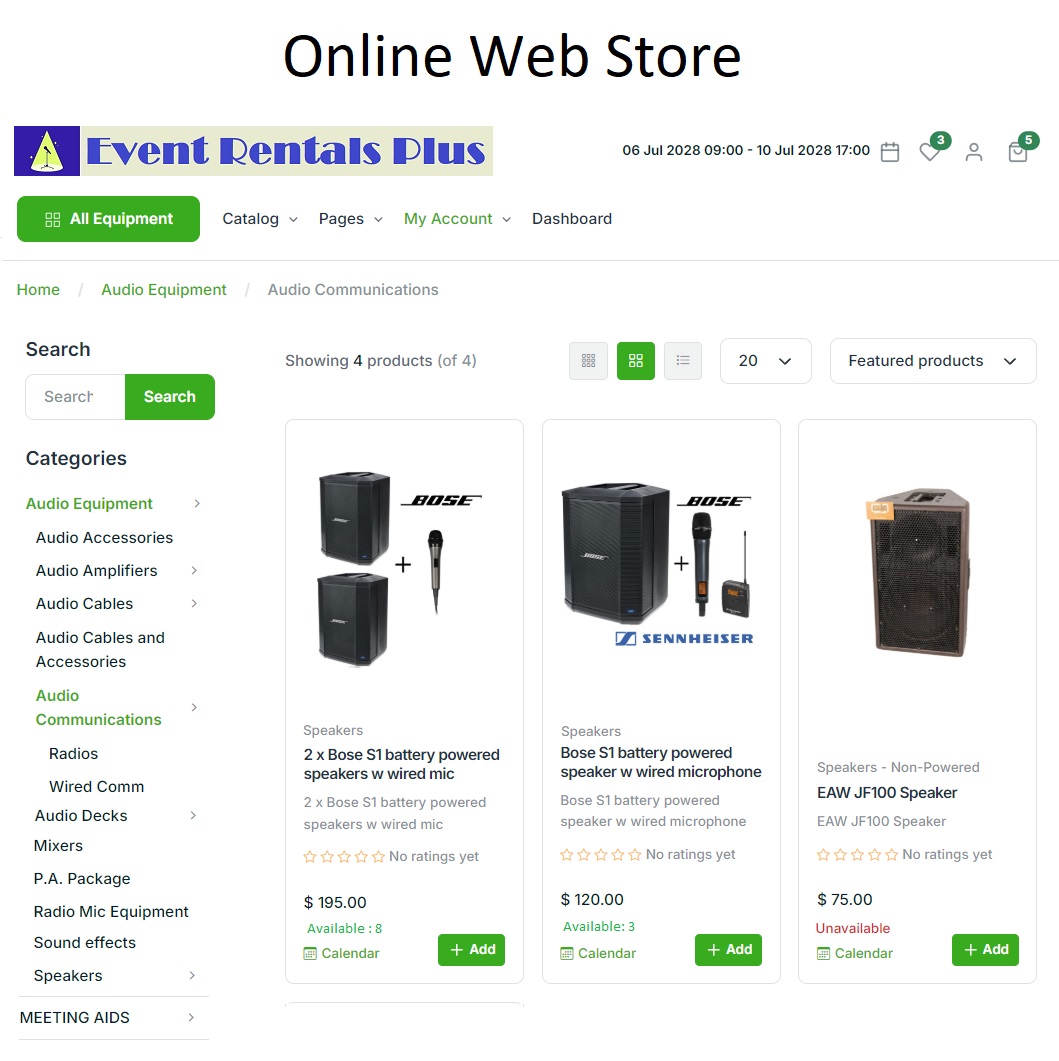
Online Rental Store
Let customers choose equipment, rental dates and times, and check out online. Decide which products appear in your store and whether to display availability. The optional store connects with the back-office workflow, where your team loads online orders, sends confirmations and requests deposits when needed.
RentalPoint online rental store
Customer shopping cart and checkout, with no booking commission charged by RentalPoint.
Product availability, accessories, wish lists and coupons.
Configurable branding, content pages and minimum booking lead times.
The Online Rental Store is an optional add-on. Your team loads online orders, confirms them and requests deposits when needed.
Send quotations and proposals to customers for acceptance and an online signature. Use RentalPoint’s built-in acceptance feature or its DocuSign integration, then view the documents you have sent and their status. This gives the team a place to review document progress alongside the quotation workflow.
Send quotations and proposals for customer acceptance.
View sent documents and their status.
Use built-in acceptance or connect a separate DocuSign account.
DocuSign requires a separate account. Built-in online acceptance is not a legally binding signature.
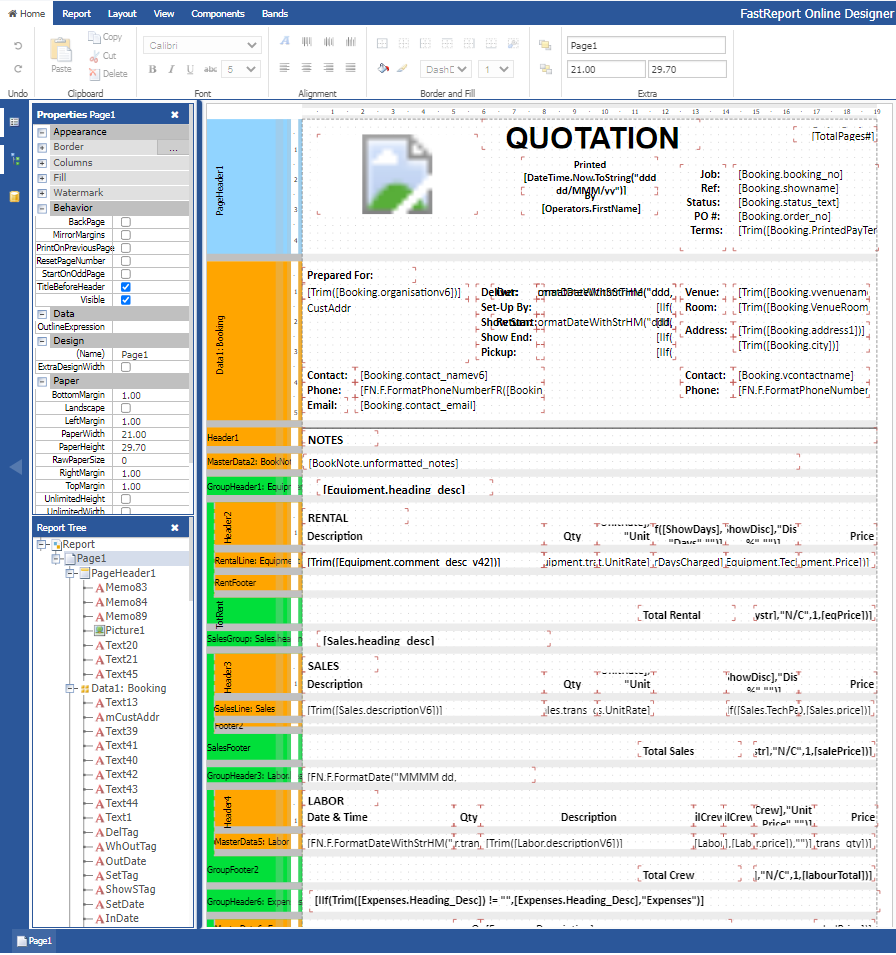
Create or modify client-facing document templates with the built-in Report Designer. Start with the standard templates supplied with RentalPoint, then adapt the layouts your team uses for proposals, quotations, invoices and other job paperwork. User-defined document templates are included in both Small Business and Professional Edition.
RentalPoint document template designer
Built-in Report Designer for creating or modifying layouts.
Standard templates supplied with the software.
Templates for proposals, quotes, invoices, packing lists and collection dockets.
Let customers pay online from a link in their invoice. With Stripe enabled, that link opens a payment popup, giving customers a route from invoice to payment. This workflow requires a Stripe account and an enabled payment connection before your customers can use the invoice payment link.
Payment links included in invoices.
A payment popup when Stripe is enabled.
A connected Stripe account is required.
Requires a Stripe account and an enabled Stripe connection.
Give sales and warehouse teams clear equipment availability and the tools to prepare each booking.
RentalPoint feature
Equipment scheduling & availability
Plan equipment movements with the Plot Sheet, Running Balance and Availability Calendar. Open bookings from the scheduling view, inspect product and asset status, and investigate expected shortages. Quick Turnaround can identify equipment coming from early pickups, de-preparation or a direct transfer between bookings, with information carried into picking.
RentalPoint equipment scheduling & availability
Three scheduling views for low-quantity, high-quantity and calendar planning.
Quick Turnaround linked to booking availability and the pick list.
Asset status, due-back information and consolidated booking counts.
Views across warehouses require the optional Multi Location feature.
Replace printed picking lists with an electronic view that supports barcode scanning or quantity-based picking. Warehouse teams can work with road cases, racks, components and reserved assets while keeping cross-rentals and Quick Turnaround visible. The pick list also supports headings for separate breakout sessions within a job.
Create cross-rental and purchase orders for rental assets or sales stock. Keep purchasing connected to the equipment and stock you manage, then print purchase orders using flexible report templates. Start with the supplied templates and adapt their layouts to suit your business and the information suppliers need.
Purchase assets or sales stock and arrange cross-rentals.
Connect purchase orders with rental assets and stock.
Use and customise supplied purchase-order templates.
The Purchase Order Module requires Professional Edition and is administered through the Windows backend.
Coordinate technicians, deliveries and multiple locations, with additional tools for venue-based operations.
Portal: Professional Edition
Crew scheduling & technician portal
Assign technicians to tasks, calculate hourly or daily charges, and keep assignments connected to event breakouts. Configure minimum hours, unpaid breaks, overtime and double time. The Professional Edition technician portal lets crew view their calendar, accept jobs, record start and finish times, and update contact and skill details.
RentalPoint crew scheduling & technician portal
Assign crew roles, tasks and technicians to jobs or breakouts.
Calculate rates, minimum hours, breaks and overtime.
Professional Edition portal for crew calendars, job acceptance and recorded hours.
Crew pricing and scheduling are included in both editions. The technician portal, time recording and Windows Crew Planner require Professional Edition.
Give delivery drivers and warehouse teams a dashboard designed for tablets and iPads. Open the day’s deliveries, returns, warehouse preparation or checkout view. Drivers can present a delivery document listing the equipment supplied and collect the client’s signature, using a document template customised in the built-in designer.
RentalPoint mobile dashboard & deliveries
View daily deliveries and returns.
Open warehouse preparation and equipment checkout.
Present delivery documents and collect customer signatures.
Coordinate branches or warehouses with the optional Multi Location add-on. Filter jobs, stock, crew and reports by location, check equipment availability locally or across locations, and transfer equipment between branches. Operators can have a home location and different access privileges at each location, with location-specific taxes, freight and invoice numbering.
Location-based jobs, inventory, crew and reporting.
Local or consolidated availability and inter-branch transfers.
Home/current asset locations and location-specific operator privileges.
Requires Professional Edition with the optional Multi Location add-on.
Manage venue commissions for in-house AV operations. Configure commission and service-charge percentages by venue, equipment category or ownership, with optional venue-specific price lists. Select individual rooms, use a tablet or printed room flowsheet for setup, and customise quotation and invoice layouts around the venue’s requirements.
Calculate and report venue commissions.
Configure venue-specific percentages and price lists.
Coordinate room setups with a tablet or printed flowsheet.
Requires Professional Edition, Multi Location and the Hotel Master Billing extension. Configuration follows a consultation.
Keep the day-to-day workflow accessible and bring bookings, totals and operational activity into view.
RentalPoint feature
Business analytics dashboard
Open dashboard cards to explore business charts, including top customers, sales by operator, and the return on investment and utilisation of top products. Adjust card colours, hide unwanted cards and control which operators can see selected information. Dashboard visibility controls are configured through the Windows backend.
Review top customers and sales by operator.
Compare product return on investment and utilisation.
Customise dashboard colours and card visibility.
Operator visibility controls use the Windows backend.
Handle core rental tasks through a browser on a desktop, tablet or smartphone, without a separate iOS or Android app. Create quotes, confirm bookings, send documents, manage assets and maintenance, and pick equipment. Additional administration features remain available through the Windows backend using Remote Desktop.
RentalPoint browser access across devices
Work on desktop, tablet or smartphone through a browser.
Manage quotes, bookings, documents, assets and picking.
Use Remote Desktop for additional Windows-backend administration.
Some administration uses the Windows backend, including Purchase Orders and Crew Planner in Professional Edition, plus additional reports, lists and settings.
Create quotations using familiar rental terminology. Browse the product tree or use keyword search to find equipment, with recognisable names for racks and road cases. These everyday tools help your team find products and build the equipment detail needed for a quotation, using the language of a rental business.
Create and build quotations.
Browse equipment through the product tree.
Find products using keyword search and familiar rental terminology.